The output from the Get-FileHash command will include a Hash value.
Note: Calculating the hash value for this large file may take about
5 minutes, so please be patient!

| Latest: www.spec.org/cpu2026/Docs/ |
Contents
Prepare for the installation
1. Review Prerequisites
2. Open a Command Prompt Window
3. Verify the download (optional, recommended)
4. Mount the ISO image
Install it
5. Run install.bat
5.a. Confirm Source and Destination
5.b. The files are unpacked and tested
6. Edit shrc.bat
Test your installed copy
7. Use your shrc.bat
8. Select a config file and try to build one benchmark
9. Try compiling an entire suite, and run the test workload
10. Try a full (reportable) run
Appendix 1: Uninstalling SPEC CPU 2026 Benchmark Suite
Appendix 2: Useful Tips and Techniques
a. About Temporary Space (%temp%)
b. About Text Files and Windows/Unix Compatibility
This document describes how to install the SPEC CPU®2026 Benchmark Suite on Microsoft Windows systems. (If you want to install under AIX, Linux, mac OS, or a similar system, you need the other install guide.) The SPEC CPU 2026 Benchmark Suite is a product of the SPEC® non-profit corporation (about SPEC).
Reminder: SPEC benchmarks are licensed software.
Please follow these steps:
Review the System Requirements. Please particularly notice the requirements for:
SPEC CPU is distributed as an ISO image. The file is large (~ 7GB); therefore it is recommended (though not required) that you verify that the download is correct before continuing.
Use the PowerShell cmdlet Get-FileHash to calculate the SHA256 Hash of the ISO image file.
The output from the Get-FileHash command will include a Hash value.
Note: Calculating the hash value for this large file may take about
5 minutes, so please be patient!
You can also use an alternative sha512sum or sha256sum utility to calculate the hash value for the ISO file image. Note that the SPEC CPU 2026 package itself provides the specsha512sum utility for Windows, so you can use that utility from a previous installation of SPEC CPU.
| q. | Is it ok to skip doing this verification? I trust my network and I don't feel like hunting for a SHA-512 tool just now. |
| a. |
It's always safer to verify downloads.
However, if you skip this step, you will probably be ok, because the installation procedure will verify the individual files within the distribution. |
There are two options:
Mount using Powershell
Mount-DiskImage -ImagePath "C:\SPEC\cpuv2026-0.88.0.iso" | Get-Volume
Mount using Windows Explorer
Note the drive letter where the ISO image or the DVD is attached. For example, D:
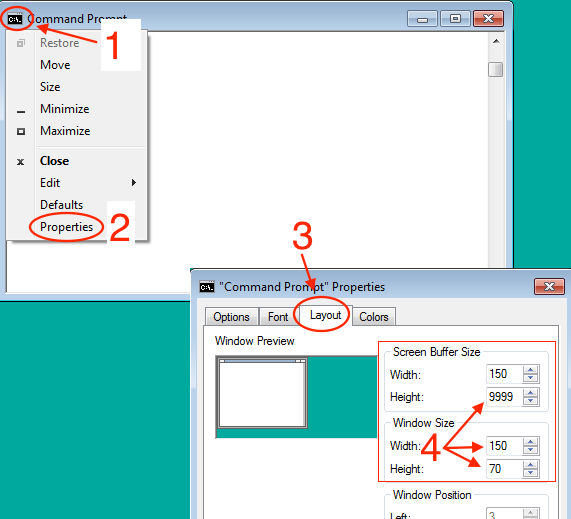
4. Open a Command Prompt WindowIf you haven't already done so, start a Command Prompt Window now.
Tip: you will probably find that the window is easier to use if you enlarge it.
|
|
The following tasks must be done from a Command Prompt. Do not attempt to run install.bat from Windows Explorer.
Change your directory to the mounted image. The following examples assume that the ISO image is mounted as drive D:, so entering just the letter and a colon changes to the right location:
C:\> D:
D:\>
You're now ready to run the installer. The format for this command is
install.bat destination_drive:\destination_directory
For example, if your ISO image is drive D:, and you want to install CPU 2026 on drive C: in a folder named CPU2026, you could type:
D:\> install.bat C:\CPU2026
You should see a message similar to the following:
D:\>install.bat  c:\CPU2026
Installing FROM source: E:\
Installing TO destination: c:\CPU2026

 If the above is NOT correct, hit Control-C and run install.bat from
 the correct benchmark tree with an argument designating the desired
 destination directory.

Press any key to continue . . .
If you see a message similar to the above, just press return. If you see error messages, check to be sure that you are in the correct directory and that %temp% is defined.
After you press return, the installation begins.
No more questions are asked. As it proceeds, the install procedure tells you what benchmarks are being unpacked.
 Depending on the speed of the source and destination devices,
 as well as how anti-virus software is configured,
 this may take anywhere from 1 minutes to more than 10 minutes.
 Please be patient.

Unpacking CPU2026 base files (71.2 MB)
Unpacking CPU2026 tools binary files (92.1 MB)
Unpacking 706.stockfish_r benchmark and data files (45.7 MB)
Unpacking 707.ntest_r benchmark and data files (50.5 MB)
Unpacking 708.sqlite_r benchmark and data files (8.9 MB)
.
.     (lines omitted)
.
Unpacking 999.specrand_r benchmark and data files (6.4 MB)

Checking the integrity of your source tree...

Depending on the amount of memory in the system and the speed of
the destination device, as well as how anti-virus software is configured,
this may take anywhere from 1 minute to more than 20 minutes.
Please be patient.

Unpacking tools binaries
Setting SPEC environment variable to C:\CPU2026\
Checking the integrity of your binary tools...
.
.     (lines omitted)
.
Runspec tests completed successfully!
+
+----------------------------------------------------------
+ To use your newly installed SPEC softwarwe, you must edit
+ and run
+         C:\CPU2026\shrc.bat
+ Please see the instructions inside it.
+----------------------------------------------------------
+
Installation completed!
Note that the testing phase (just above) may take more time than it does to do the unpacking. This is normal.
At this point, the CPU 2026 installation will be using about 8.5 GB of disk space on the destination drive.
Change your directory to the destination that has just been created, for example:
D:\> C:
C:\> cd CPU2026
C:\CPU2026\>
Open this file with a text editor, like Notepad, and read the comments at the top of the file
shrc.bat
Make the appropriate edits for your compiler paths.
| q. | When I try to edit shrc.bat, it looks like the lines are not correctly formatted. The text appears to be all run together. For example, this can happen when using notepad. |
| a | Try wordpad. For more information, see the section below: About Text Files and Windows/Unix Compatibility. |
To make the edits for your compiler path, you must first uncomment one of two lines:
Around line 40:
rem set SHRC_PRECOMPILED=yes
Or, around line 50:
rem set SHRC_COMPILER_PATH_SET=yes
Uncomment one of them by removing "rem" from the beginning of the desired line.
If you uncomment the first line, you must have pre-compiled binaries for the benchmarks
If you uncomment the second line, you will have to follow the instructions (a few lines below further along in shrc.bat) to set up the environment for your compiler, either (A) by calling a vendor-supplied batch setup file or (B) by entering the path yourself:
It is usually better to call a vendor-supplied batch setup file, because the file may set additional needed variables, such as INCLUDE and LIB. Examples of vendor files, such as iclvars, vcvars, and vsvars, are in the comments within shrc.bat. Do not assume that any of those examples will work on your system: you need to check first. The names and locations of these files change from compiler to compiler, from version to version, and even from system to system (if you choose a non-default installation directory).
For example, if you are using Microsoft Visual C/C++ provided by Microsoft Visual Studio 2022 Community Edition, you can call the
Microsoft-provided batch setup file by inserting this line into shrc.bat, just after the line
XXXXXXXX BEGIN EDIT HERE XXXXXXXXXXX:
call "C:\Program Files\Microsoft Visual Studio\2022\Community\VC\Auxiliary\Build\vcvars64.bat"
If you enter a path directly:
No matter how your path gets set, in general it is a good idea to understand what is in your path, and that you have only what you truly need. If you have non-standard versions of commonly used utilities in your path, you may avoid unpleasant surprises by taking them out. By default, shrc.bat will print the path after it is done. If you would prefer that it not do so, you can set SHRC_QUIET=yes in your environment.
From this point forward, we are testing basic capabilities of the installed version of the SPEC CPU 2026 benchmark suite, including compiling benchmarks and running them.
If you prefer to skip this part, perhaps because someone else has given you pre-compiled binaries, please note that you remain responsible for compliance with SPEC's Fair Use rule and the SPEC CPU 2026 run rules.
Set the environment, using your edited shrc. For example:
C:\CPU2026> shrc.bat
Find a Config File: You will need to select a config file. Config files contain details such as portability and optimization options. If you are a beginner, you will probably start with an existing config file. You can find one:
On your installed copy of SPEC CPU 2026:
$SPEC/config/Example*        (Unix) or
%SPEC%\config\Example*       (Windows)
Name it: Copy your selection to a new file the config file to the config directory. Give it a name that does not use blanks. If you have copied one of the Example* files from the /config/ directory, you must re-name it. Hint: make the name something useful to *you*, for example:
%SPEC%\config\Rahuls_first_test.cfg
Open this file with a text editor, like Notepad.
Edit the label: Look for a line in the file that defines the label variable, like
label = mytest # EDIT
The label is an arbitrary tag that is added to your binaries and directories, which can come in very handy when you need to (for example) find your run directories, analyze a problem, and clean disk space. No blanks are allowed. Change it to something meaningful for you, such as
label = mybox-test
Hint: Anything after a hash mark (#) is a comment, which gets ignored.
Other Edits:
Look for any commands in the config file, and verify that they will not cause surprises.
Warning: SPEC CPU config files can execute arbitrary
shell commands.
Read a config file before using it.
Don't be root.
Don't run as Administrator.
Turn privileges off.
Select a benchmark to try first. Begin with a benchmark that compiles quickly, such as 708.sqlite_r for SPECrate®; or 854.graph500_s for SPECspeed®.
Example: Here, the user starts with a config file for Microsoft Visual C/C++ for Windows / x86, edits it, and runs 708.sqlite_r.
C:\CPU2026> cd %SPEC%\config
C:\CPU2026> copy Example-msvc-windows-x86.cfg try.cfg
   .
   . Now use your favorite editor and edit try.cfg.  Look for places marked 'EDIT'.
   .
c:\CPU2026> cd %SPEC%
c:\CPU2026> runcpu -c try.cfg --action build 708.sqlite_r
SPEC CPU 2026 Benchmark suites
Copyright 1995-2023 Standard Performance Evaluation Corporation

runcpu (32bd8425)
Using 'windows-x64 ' tools
Reading file manifests... read 64514 entries from 2 files in 0.36s (180100 files/s)
Loading runcpu modules................
Locating benchmarks...found 55 benchmarks in 101 benchsets.
Reading config file 'C:/CPU2026/config/try.cfg'
Running "specperl C:/CPU2026/Docs/sysinfo" to gather system information.
Retrieving flags file (C:/CPU2026/config/flags/msvc-windows.xml)...


1 configuration selected:

Action   Benchmarks
------   ----------------------------------------------------------------------
build    708.sqlite_r
-------------------------------------------------------------------------------

Benchmarks selected: 708.sqlite_r
Compiling Binaries
  Building 708.sqlite_r base mytry1: (build_base__mytry1_.0000) [2025-10-15 22:10:43]

Build successes for intrate: 708.sqlite_r(base)
Build errors for intrate: None

Build Complete
The log for this run is in C:/CPU2026/result/CPU2026.001.log

runcpu finished at 2025-10-15 22:11:57; 14 total seconds elapsed

c:\CPU2026>
| If the above succeeds |
You have established that the SPEC CPU 2026 benchmark suite is installed and the tools can use your config file to find a "C" compiler. Let us take a brief look at the results of the above command:
C:\CPU2026> cd %SPEC%\benchspec\CPU\708.sqlite_r\exe
C:\CPU2026\benchspec\CPU\708.sqlite_r\exe>dir
sqlite_r_base.mytry1
C:\CPU2026\benchspec\CPU\708.sqlite_r\exe>cd ..\build
C:\CPU2026\benchspec\CPU\708.sqlite_r\build>dir
build_base_mytry1.0000
C:\CPU2026\benchspec\CPU\708.sqlite_r\exe>cd build_base_mytry1.0000
C:\CPU2026\benchspec\CPU\708.sqlite_r\exe>dir
10/15/2025  22:10 AM         94 compiler-version.err
10/15/2025  22:10 AM        211 compiler-version.out
10/15/2025  22:10 AM        635 make.clean.out
10/15/2025  22:10 AM      1,382 make.out
10/15/2025  22:10 AM        223 Makefile
   .
   . some more files
   .
10/15/2025  22:10 AM     87,106 speedtest1.c
10/15/2025  22:10 AM    159,954 speedtest1.obj
10/15/2025  22:10 AM  8,115,470 sqlite3.c
10/15/2025  22:10 AM    580,572 sqlite3.h
10/15/2025  22:10 AM  2,588,291 sqlite3.obj
10/15/2025  22:10 AM  1,071,104 sqlite_r.exe
C:\CPU2026\benchspec\CPU\708.sqlite_r\exe>cd %SPEC%\result
C:\CPU2026\result>dir
10/15/2025  22:10 AM         94 CPU2026.001.log
10/15/2025  22:10 AM        211 CPU2026.001.log.debug
|
| If the above fails |
Usually, failures happen if you start with a config file that is not intended for your operating
system and compiler (About Config Files),
If a file is mentioned with more information, please carefully examine that file (e.g. benchspec\CPU2026\nnn.mumble\build_base_mumble.0000\mumble.err) You can use locate the log file and the build directory, and useful files within the build, using commands similar to these:
C:\CPU2026> cd %SPEC%\result
C:\CPU2026\result> dir *log
CPU2026.001.log

C:\CPU2026\result>cd %SPEC%\benchspec\CPU\708.sqlite_r\build
C:\CPU2026\benchspec\CPU\708.sqlite_r\build>dir
build_base_mytry1.0000
C:\CPU2026\benchspec\CPU\708.sqlite_r\exe>cd build_base_mytry1.0000
C:\CPU2026\benchspec\CPU\708.sqlite_r\exe>dir

C:\CPU2026\benchspec\CPU\708.sqlite_r\build\build_base_mytry1.0000> dir *err *out
make.clean.out  make.out  options.err  options.out
|
The SPEC CPU 2026 benchmark suite contains benchmarks which are divided into 4 suites:
Let's pick a suite and build all the benchmarks in that suite. The command below,
c:\CPU2026>runcpu -c try.cfg --size test --iterations 1 --noreportable intrate
SPEC CPU 2026 Benchmark Suites
Copyright 1995-2023 Standard Performance Evaluation Corporation (SPEC)

runcpu (32bd8425)
Using 'windows-x64 ' tools
Reading file manifests... read 64514 entries from 2 files in 0.33s (193680 files/s)
Loading runcpu modules.................
Locating benchmarks...found 55 benchmarks in 101 benchsets.
Reading config file 'C:/CPU2026/config/try.cfg'
Running "specperl C:/CPU2026/bin/sysinfo" to gather system information.
Retrieving flags file (C:/CPU2026/config/flags/msvc-windows.xml)...
1 configuration selected:

 Action    Run Mode   Workload     Report Type     Benchmarks
--------   --------   --------   ---------------   ----------------------------
validate   rate       test       SPECrate_2026_int intrate
-------------------------------------------------------------------------------

Benchmarks selected: 706.stockfish_r, 707.ntest_r, 708.sqlite_r, 710.omnetpp_r, 714.cpython_r, 721.gcc_r, 723.llvm_r, 727.cppcheck_r, 729.abc_r, 734.vpr_r, 735.gem5_r, 750.sealcrypto_r, 753.ns3_r, 777.zstd_r
Compiling Binaries
  Building 706.stockfish_r base mytry1: (build_base_mytry1.0000) [2025-10-19 12:07:14]
  Building 707.ntest_r base mytry1: (build_base_mytry1.0000) [2025-10-19 12:07:22]
  Up to date 708.sqlite_r base mytry1
  Building 710.omnetpp_r base mytry1: (build_base_mytry1.0000) [2025-10-19 12:07:32]
  Building 714.cpython_r base mytry1: (build_base_mytry1.0000) [2025-10-19 12:08:38]
  Building 721.gcc_r base mytry1: (build_base_mytry1.0000) [2025-10-19 12:09:16]
  Building 723.llvm_r base mytry1: (build_base_mytry1.0000) [2025-10-19 12:13:13]
  Building 727.cppcheck_r base mytry1: (build_base_mytry1.0000) [2025-10-19 12:26:16]
  Building 729.abc_r base mytry1: (build_base_mytry1.0000) [2025-10-19 12:28:19]
  Building 734.vpr_r base mytry1: (build_base_mytry1.0000) [2025-10-19 12:29:43]
  Building 735.gem5_r base mytry1: (build_base_mytry1.0000) [2025-10-19 12:31:39]
  Building 750.sealcrypto_r base mytry1: (build_base_mytry1.0000) [2025-10-19 12:43:10]
  Building 753.ns3_r base mytry1: (build_base_mytry1.0000) [2025-10-19 12:43:24]
  Building 777.zstd_r base mytry1: (build_base_mytry1.0000) [2025-10-19 14:30:53]

Build successes for intrate: 706.stockfish_r(base), 707.ntest_r(base), 710.omnetpp_r(base), 714.cpython_r(base), 721.gcc_r(base), 723.llvm_r(base), 727.cppcheck_r(base), 729.abc_r(base), 734.vpr_r(base), 735.gem5_r(base), 750.sealcrypto_r(base), 753.ns3_r(base), 777.zstd_r(base)
Build errors for intrate: None

Setting Up Run Directories
  Setting up 706.stockfish_r test base mytry1 (1 copy): run_base_test_mytry1.0000
  Setting up 707.ntest_r test base mytry1 (1 copy): run_base_test_mytry1.0000
  Setting up 708.sqlite_r test base mytry1 (1 copy): run_base_test_mytry1.0000
  Setting up 710.omnetpp_r test base mytry1 (1 copy): run_base_test_mytry1.0000
  Setting up 714.cpython_r test base mytry1 (1 copy): run_base_test_mytry1.0000
  Setting up 721.gcc_r test base mytry1 (1 copy): run_base_test_mytry1.0000
  Setting up 723.llvm_r test base mytry1 (1 copy): run_base_test_mytry1.0000
  Setting up 727.cppcheck_r test base mytry1 (1 copy): run_base_test_mytry1.0000
  Setting up 729.abc_r test base mytry1 (1 copy): run_base_test_mytry1.0000
  Setting up 734.vpr_r test base mytry1 (1 copy): run_base_test_mytry1.0000
  Setting up 735.gem5_r test base mytry1 (1 copy): run_base_test_mytry1.0000
  Setting up 750.sealcrypto_r test base mytry1 (1 copy): run_base_test_mytry1.0000
  Setting up 753.ns3_r test base mytry1 (1 copy): run_base_test_mytry1.0000
  Setting up 777.zstd_r test base mytry1 (1 copy): run_base_test_mytry1.0000
Running Benchmarks
  Running 706.stockfish_r test base mytry1 (1 copy) [2025-10-19 14:31:23]
  Running 707.ntest_r test base mytry1 (1 copy) [2025-10-19 14:31:27]
  Running 708.sqlite_r test base mytry1 (1 copy) [2025-10-19 14:31:28]
  Running 710.omnetpp_r test base mytry1 (1 copy) [2025-10-19 14:31:29]
  Running 714.cpython_r test base mytry1 (1 copy) [2025-10-19 14:31:31]
  Running 721.gcc_r test base mytry1 (1 copy) [2025-10-19 14:31:33]
  Running 723.llvm_r test base mytry1 (1 copy) [2025-10-19 14:31:34]
  Running 727.cppcheck_r test base mytry1 (1 copy) [2025-10-19 14:31:35]
  Running 729.abc_r test base mytry1 (1 copy) [2025-10-19 14:32:19]
  Running 734.vpr_r test base mytry1 (1 copy) [2025-10-19 14:32:22]
  Running 735.gem5_r test base mytry1 (1 copy) [2025-10-19 14:32:51]
  Running 750.sealcrypto_r test base mytry1 (1 copy) [2025-10-19 14:32:55]
  Running 753.ns3_r test base mytry1 (1 copy) [2025-10-19 14:33:07]
  Running 777.zstd_r test base mytry1 (1 copy) [2025-10-19 14:33:19]
Success: 1x706.stockfish_r 1x707.ntest_r 1x708.sqlite_r 1x710.omnetpp_r 1x714.cpython_r 1x721.gcc_r 1x723.llvm_r 1x727.cppcheck_r 1x729.abc_r 1x734.vpr_r 1x735.gem5_r 1x750.sealcrypto_r 1x753.ns3_r 1x777.zstd_r
Producing Raw Reports
 label: mytry1
  workload: test
   metric: SPECrate_2026_int_base
    format: raw -> C:/CPU2026/result/CPU2026.002.intrate.test.rsf
Parsing flags for 706.stockfish_r base: done
Parsing flags for 707.ntest_r base: done
Parsing flags for 708.sqlite_r base: done
Parsing flags for 710.omnetpp_r base: done
Parsing flags for 714.cpython_r base: done
Parsing flags for 721.gcc_r base: done
Parsing flags for 723.llvm_r base: done
Parsing flags for 727.cppcheck_r base: done
Parsing flags for 729.abc_r base: done
Parsing flags for 734.vpr_r base: done
Parsing flags for 735.gem5_r base: done
Parsing flags for 750.sealcrypto_r base: done
Parsing flags for 753.ns3_r base: done
Parsing flags for 777.zstd_r base: done
Doing flag reduction: done
    format: flags -> C:/CPU2026/result/CPU2026.002.intrate.test.flags.html
    format: cfg -> C:/CPU2026/result/CPU2026.002.intrate.test.cfg
    format: CSV -> C:/CPU2026/result/CPU2026.002.intrate.test.csv
    format: PDF -> C:/CPU2026/result/CPU2026.002.intrate.test.pdf
    format: HTML -> C:/CPU2026/result/CPU2026.002.intrate.test.html
    format: Text -> C:/CPU2026/result/CPU2026.002.intrate.test.txt
The log for this run is in C:/CPU2026/result/CPU2026.002.log

runcpu finished at 2025-10-19 14:33:47; 8795 total seconds elapsed
c:\CPU2026>
Note above that compiling the SPEC CPU 2026 Integer Rate benchmarks and running the brief test workload took about two and a half hours (8795 seconds). Your time may be considerably different (faster or slower), for example when using other compilers or building other suites (recall that there are 4 suites in the SPEC CPU 2026 benchmark product: intrate, fprate, intspeed, fpspeed). The time required to do a build also depends directly upon the config file optimization selections.
If everything has worked up to this point, you may wish to start a full run, perhaps leaving your computer to run overnight. The extended test will demand significant hardware resources from your machine (System Requirements)
In the example below, a reportable run is requested, using 10 copies of the benchmarks:
c:\CPU2026>runcpu -c try.cfg --reportable --copies=2 intrate
SPEC CPU 2026 Benchmark Suites
Copyright 1995-2023 Standard Performance Evaluation Corporation (SPEC)

runcpu (32bd8425)
Using 'windows-x64 ' tools
Reading file manifests... read 64514 entries from 2 files in 0.34s (191117 files/s)
Loading runcpu modules.................
Locating benchmarks...found 55 benchmarks in 101 benchsets.
Reading config file 'C:/CPU2026/config/try.cfg'
Running "specperl C:/CPU2026/bin/sysinfo" to gather system information.
Retrieving flags file (C:/CPU2026/config/flags/msvc-windows.xml)...
1 configuration selected:

 Action    Run Mode   Workload     Report Type     Benchmarks
--------   --------   --------   ---------------   ----------------------------
validate   rate       refrate    SPECrate_2026_int   intrate
Downloading update information for version check...
NOTICE: Could not retrieve update metadata;got
  Not Found

...Version check failed.
          A connection to the internet is useful, but is NOT required
          in order to run CPU 2026.  If one is available, several
          components will be checked to see if they are current.  If
          you need to use an HTTP proxy to access the Internet, please
          see the 'http_proxy' entry in config.html.

                       ----------------------------------
                       The run will continue in 5 seconds
                       ----------------------------------
The above message is expected if you are behind a firewall.
The run continues after 5 seconds:
Reportable runs must include a 'test' run; adding to run list
Reportable runs must include a 'train' run; adding to run list
-------------------------------------------------------------------------------
For a reportable
run, all three workload sizes are run. For test
and train, the only requirement is that they generate valid output. They are
not timed.
In the next section, the test workloads are run.
Benchmarks selected: 706.stockfish_r, 707.ntest_r, 708.sqlite_r, 710.omnetpp_r, 714.cpython_r, 721.gcc_r, 723.llvm_r, 727.cppcheck_r, 729.abc_r, 734.vpr_r, 735.gem5_r, 750.sealcrypto_r, 753.ns3_r, 777.zstd_r
Notice: Errors may not be ignored for reportable runs.
Compiling Binaries
  Up to date 706.stockfish_r base mytry1
  Up to date 707.ntest_r base mytry1
  Up to date 708.sqlite_r base mytry1
  Up to date 710.omnetpp_r base mytry1
  Up to date 714.cpython_r base mytry1
  Up to date 721.gcc_r base mytry1
  Up to date 723.llvm_r base mytry1
  Up to date 727.cppcheck_r base mytry1
  Up to date 729.abc_r base mytry1
  Up to date 734.vpr_r base mytry1
  Up to date 735.gem5_r base mytry1
  Up to date 750.sealcrypto_r base mytry1
  Up to date 753.ns3_r base mytry1
  Up to date 777.zstd_r base mytry1


Setting Up Run Directories
  Setting up 706.stockfish_r test base mytry1 (1 copy): run_base_test_mytry1.0000
  Setting up 707.ntest_r test base mytry1 (1 copy): run_base_test_mytry1.0000
  Setting up 708.sqlite_r test base mytry1 (1 copy): run_base_test_mytry1.0000
  Setting up 710.omnetpp_r test base mytry1 (1 copy): run_base_test_mytry1.0000
  Setting up 714.cpython_r test base mytry1 (1 copy): run_base_test_mytry1.0000
  Setting up 721.gcc_r test base mytry1 (1 copy): run_base_test_mytry1.0000
  Setting up 723.llvm_r test base mytry1 (1 copy): run_base_test_mytry1.0000
  Setting up 727.cppcheck_r test base mytry1 (1 copy): run_base_test_mytry1.0000
  Setting up 729.abc_r test base mytry1 (1 copy): run_base_test_mytry1.0000
  Setting up 734.vpr_r test base mytry1 (1 copy): run_base_test_mytry1.0000
  Setting up 735.gem5_r test base mytry1 (1 copy): run_base_test_mytry1.0000
  Setting up 750.sealcrypto_r test base mytry1 (1 copy): run_base_test_mytry1.0000
  Setting up 753.ns3_r test base mytry1 (1 copy): run_base_test_mytry1.0000
  Setting up 777.zstd_r test base mytry1 (1 copy): run_base_test_mytry1.0000
Running Benchmarks
  Running 706.stockfish_r test base mytry1 (1 copy) [2025-10-19 14:41:59]
  Running 707.ntest_r test base mytry1 (1 copy) [2025-10-19 14:42:03]
  Running 708.sqlite_r test base mytry1 (1 copy) [2025-10-19 14:42:04]
  Running 710.omnetpp_r test base mytry1 (1 copy) [2025-10-19 14:42:04]
  Running 714.cpython_r test base mytry1 (1 copy) [2025-10-19 14:42:06]
  Running 721.gcc_r test base mytry1 (1 copy) [2025-10-19 14:42:08]
  Running 723.llvm_r test base mytry1 (1 copy) [2025-10-19 14:42:09]
  Running 727.cppcheck_r test base mytry1 (1 copy) [2025-10-19 14:42:10]
  Running 729.abc_r test base mytry1 (1 copy) [2025-10-19 14:42:54]
  Running 734.vpr_r test base mytry1 (1 copy) [2025-10-19 14:42:56]
  Running 735.gem5_r test base mytry1 (1 copy) [2025-10-19 14:43:26]
  Running 750.sealcrypto_r test base mytry1 (1 copy) [2025-10-19 14:43:30]
  Running 753.ns3_r test base mytry1 (1 copy) [2025-10-19 14:43:41]
  Running 777.zstd_r test base mytry1 (1 copy) [2025-10-19 14:43:53]
Success: 1x706.stockfish_r 1x707.ntest_r 1x708.sqlite_r 1x710.omnetpp_r 1x714.cpython_r 1x721.gcc_r 1x723.llvm_r 1x727.cppcheck_r 1x729.abc_r 1x734.vpr_r 1x735.gem5_r 1x750.sealcrypto_r 1x753.ns3_r 1x777.zstd_r
Benchmarks selected: 706.stockfish_r, 707.ntest_r, 708.sqlite_r, 710.omnetpp_r, 714.cpython_r, 721.gcc_r, 723.llvm_r, 727.cppcheck_r, 729.abc_r, 734.vpr_r, 735.gem5_r, 750.sealcrypto_r, 753.ns3_r, 777.zstd_r
Notice: Errors may not be ignored for reportable runs.
The test workload is not timed.
After all the test workloads are done, the train workloads are started:
Compiling Binaries
  Up to date 706.stockfish_r base mytry1
  Up to date 707.ntest_r base mytry1
  Up to date 708.sqlite_r base mytry1
  Up to date 710.omnetpp_r base mytry1
  Up to date 714.cpython_r base mytry1
  Up to date 721.gcc_r base mytry1
  Up to date 723.llvm_r base mytry1
  Up to date 727.cppcheck_r base mytry1
  Up to date 729.abc_r base mytry1
  Up to date 734.vpr_r base mytry1
  Up to date 735.gem5_r base mytry1
  Up to date 750.sealcrypto_r base mytry1
  Up to date 753.ns3_r base mytry1
  Up to date 777.zstd_r base mytry1
Because the benchmarks were already compiled in order to run the test workloads,
they don't need to be compiled again for the train workloads.
Setting Up Run Directories
  Setting up 706.stockfish_r train base mytry1 (1 copy): run_base_train_mytry1.0000
  Setting up 707.ntest_r train base mytry1 (1 copy): run_base_train_mytry1.0000
  Setting up 708.sqlite_r train base mytry1 (1 copy): run_base_train_mytry1.0000
  Setting up 710.omnetpp_r train base mytry1 (1 copy): run_base_train_mytry1.0000
  Setting up 714.cpython_r train base mytry1 (1 copy): run_base_train_mytry1.0000
  Setting up 721.gcc_r train base mytry1 (1 copy): run_base_train_mytry1.0000
  Setting up 723.llvm_r train base mytry1 (1 copy): run_base_train_mytry1.0000
  Setting up 727.cppcheck_r train base mytry1 (1 copy): run_base_train_mytry1.0000
  Setting up 729.abc_r train base mytry1 (1 copy): run_base_train_mytry1.0000
  Setting up 734.vpr_r train base mytry1 (1 copy): run_base_train_mytry1.0000
  Setting up 735.gem5_r train base mytry1 (1 copy): run_base_train_mytry1.0000
  Setting up 750.sealcrypto_r train base mytry1 (1 copy): run_base_train_mytry1.0000
  Setting up 753.ns3_r train base mytry1 (1 copy): run_base_train_mytry1.0000
  Setting up 777.zstd_r train base mytry1 (1 copy): run_base_train_mytry1.0000
Running Benchmarks
  Running 706.stockfish_r train base mytry1 (1 copy) [2025-10-19 14:44:24]
  Running 707.ntest_r train base mytry1 (1 copy) [2025-10-19 14:46:48]
  Running 708.sqlite_r train base mytry1 (1 copy) [2025-10-19 14:47:30]
  Running 710.omnetpp_r train base mytry1 (1 copy) [2025-10-19 14:47:56]
  Running 714.cpython_r train base mytry1 (1 copy) [2025-10-19 14:48:38]
  Running 721.gcc_r train base mytry1 (1 copy) [2025-10-19 14:49:09]
  Running 723.llvm_r train base mytry1 (1 copy) [2025-10-19 14:49:51]
  Running 727.cppcheck_r train base mytry1 (1 copy) [2025-10-19 14:50:31]
  Running 729.abc_r train base mytry1 (1 copy) [2025-10-19 14:52:29]
  Running 734.vpr_r train base mytry1 (1 copy) [2025-10-19 14:53:20]
  Running 735.gem5_r train base mytry1 (1 copy) [2025-10-19 14:54:18]
  Running 750.sealcrypto_r train base mytry1 (1 copy) [2025-10-19 14:55:24]
  Running 753.ns3_r train base mytry1 (1 copy) [2025-10-19 14:56:23]
  Running 777.zstd_r train base mytry1 (1 copy) [2025-10-19 14:58:08]
Success: 1x706.stockfish_r 1x707.ntest_r 1x708.sqlite_r 1x710.omnetpp_r 1x714.cpython_r 1x721.gcc_r 1x723.llvm_r 1x727.cppcheck_r 1x729.abc_r 1x734.vpr_r 1x735.gem5_r 1x750.sealcrypto_r 1x753.ns3_r 1x777.zstd_r
Benchmarks selected: 706.stockfish_r, 707.ntest_r, 708.sqlite_r, 710.omnetpp_r, 714.cpython_r, 721.gcc_r, 723.llvm_r, 727.cppcheck_r, 729.abc_r, 734.vpr_r, 735.gem5_r, 750.sealcrypto_r, 753.ns3_r, 777.zstd_r
Notice: 706.stockfish_r has 1 iteration.
        This is not correct for a reportable run.  Changing iterations to 2
        for ALL benchmarks.
Notice: Errors may not be ignored for reportable runs.
After the train workloads are done, the timed, "refrate", workloads begin.
Compiling Binaries
  Up to date 706.stockfish_r base mytry1
  Up to date 707.ntest_r base mytry1
  Up to date 708.sqlite_r base mytry1
  Up to date 710.omnetpp_r base mytry1
  Up to date 714.cpython_r base mytry1
  Up to date 721.gcc_r base mytry1
  Up to date 723.llvm_r base mytry1
  Up to date 727.cppcheck_r base mytry1
  Up to date 729.abc_r base mytry1
  Up to date 734.vpr_r base mytry1
  Up to date 735.gem5_r base mytry1
  Up to date 750.sealcrypto_r base mytry1
  Up to date 753.ns3_r base mytry1
  Up to date 777.zstd_r base mytry1


Setting Up Run Directories
  Setting up 706.stockfish_r refrate (ref) base mytry1 (2 copies): run_base_refrate_mytry1.0000, run_base_refrate_mytry1-0001
  Setting up 707.ntest_r refrate (ref) base mytry1 (2 copies): run_base_refrate_mytry1.0000, run_base_refrate_mytry1-0001
  Setting up 708.sqlite_r refrate (ref) base mytry1 (2 copies): run_base_refrate_mytry1.0000, run_base_refrate_mytry1-0001
  Setting up 710.omnetpp_r refrate (ref) base mytry1 (2 copies): run_base_refrate_mytry1.0000, run_base_refrate_mytry1-0001
  Setting up 714.cpython_r refrate (ref) base mytry1 (2 copies): run_base_refrate_mytry1.0000, run_base_refrate_mytry1-0001
  Setting up 721.gcc_r refrate (ref) base mytry1 (2 copies): run_base_refrate_mytry1.0000, run_base_refrate_mytry1-0001
  Setting up 723.llvm_r refrate (ref) base mytry1 (2 copies): run_base_refrate_mytry1.0000, run_base_refrate_mytry1-0001
  Setting up 727.cppcheck_r refrate (ref) base mytry1 (2 copies): run_base_refrate_mytry1.0000, run_base_refrate_mytry1-0001
  Setting up 729.abc_r refrate (ref) base mytry1 (2 copies): run_base_refrate_mytry1.0000, run_base_refrate_mytry1-0001
  Setting up 734.vpr_r refrate (ref) base mytry1 (2 copies): run_base_refrate_mytry1.0000, run_base_refrate_mytry1-0001
  Setting up 735.gem5_r refrate (ref) base mytry1 (2 copies): run_base_refrate_mytry1.0000, run_base_refrate_mytry1-0001
  Setting up 750.sealcrypto_r refrate (ref) base mytry1 (2 copies): run_base_refrate_mytry1.0000, run_base_refrate_mytry1-0001
  Setting up 753.ns3_r refrate (ref) base mytry1 (2 copies): run_base_refrate_mytry1.0000, run_base_refrate_mytry1-0001
  Setting up 777.zstd_r refrate (ref) base mytry1 (2 copies): run_base_refrate_mytry1.0000, run_base_refrate_mytry1-0001
Running Benchmarks
  Running (#1) 706.stockfish_r refrate (ref) base mytry1 (2 copies) [2025-10-19 14:59:56]
  Running (#1) 707.ntest_r refrate (ref) base mytry1 (2 copies) [2025-10-19 15:13:34]
  Running (#1) 708.sqlite_r refrate (ref) base mytry1 (2 copies) [2025-10-19 15:17:47]
  Running (#1) 710.omnetpp_r refrate (ref) base mytry1 (2 copies) [2025-10-19 15:22:17]
  Running (#1) 714.cpython_r refrate (ref) base mytry1 (2 copies) [2025-10-19 15:27:19]
  Running (#1) 721.gcc_r refrate (ref) base mytry1 (2 copies) [2025-10-19 15:30:22]
  Running (#1) 723.llvm_r refrate (ref) base mytry1 (2 copies) [2025-10-19 16:11:07]
  Running (#1) 727.cppcheck_r refrate (ref) base mytry1 (2 copies) [2025-10-19 16:15:25]
  Running (#1) 729.abc_r refrate (ref) base mytry1 (2 copies) [2025-10-19 16:19:17]
  Running (#1) 734.vpr_r refrate (ref) base mytry1 (2 copies) [2025-10-19 16:22:44]
  Running (#1) 735.gem5_r refrate (ref) base mytry1 (2 copies) [2025-10-19 16:26:57]
  Running (#1) 750.sealcrypto_r refrate (ref) base mytry1 (2 copies) [2025-10-19 16:32:03]
  Running (#1) 753.ns3_r refrate (ref) base mytry1 (2 copies) [2025-10-19 16:36:04]
  Running (#1) 777.zstd_r refrate (ref) base mytry1 (2 copies) [2025-10-19 16:46:56]
  Running (#2) 706.stockfish_r refrate (ref) base mytry1 (2 copies) [2025-10-19 16:52:22]
  Running (#2) 707.ntest_r refrate (ref) base mytry1 (2 copies) [2025-10-19 17:06:17]
  Running (#2) 708.sqlite_r refrate (ref) base mytry1 (2 copies) [2025-10-19 17:10:37]
  Running (#2) 710.omnetpp_r refrate (ref) base mytry1 (2 copies) [2025-10-19 17:15:14]
  Running (#2) 714.cpython_r refrate (ref) base mytry1 (2 copies) [2025-10-19 17:20:26]
  Running (#2) 721.gcc_r refrate (ref) base mytry1 (2 copies) [2025-10-19 17:23:31]
  Running (#2) 723.llvm_r refrate (ref) base mytry1 (2 copies) [2025-10-19 17:28:46]
  Running (#2) 727.cppcheck_r refrate (ref) base mytry1 (2 copies) [2025-10-19 17:33:14]
  Running (#2) 729.abc_r refrate (ref) base mytry1 (2 copies) [2025-10-19 17:37:10]
  Running (#2) 734.vpr_r refrate (ref) base mytry1 (2 copies) [2025-10-19 17:40:42]
  Running (#2) 735.gem5_r refrate (ref) base mytry1 (2 copies) [2025-10-19 17:44:58]
  Running (#2) 750.sealcrypto_r refrate (ref) base mytry1 (2 copies) [2025-10-19 17:50:16]
  Running (#2) 753.ns3_r refrate (ref) base mytry1 (2 copies) [2025-10-19 17:54:23]
  Running (#2) 777.zstd_r refrate (ref) base mytry1 (2 copies) [2025-10-19 18:05:22]
Success: 2x706.stockfish_r 2x707.ntest_r 2x708.sqlite_r 2x710.omnetpp_r 2x714.cpython_r 2x721.gcc_r 2x723.llvm_r
 2x727.cppcheck_r 2x729.abc_r 2x734.vpr_r 2x735.gem5_r 2x750.sealcrypto_r 2x753.ns3_r 2x777.zstd_rProducing Raw Reports
Producing Raw Reports
 label: mytry1
  workload: refrate (ref)
NOTICE: sw_compiler001 is longer than 50 characters and will be split
   metric: SPECrate_2026_int_base
    format: raw -> C:/CPU2026/result/CPU2026.003.intrate.rsf
Parsing flags for 706.stockfish_r base: done
Parsing flags for 707.ntest_r base: done
Parsing flags for 708.sqlite_r base: done
Parsing flags for 710.omnetpp_r base: done
Parsing flags for 714.cpython_r base: done
Parsing flags for 721.gcc_r base: done
Parsing flags for 723.llvm_r base: done
Parsing flags for 727.cppcheck_r base: done
Parsing flags for 729.abc_r base: done
Parsing flags for 734.vpr_r base: done
Parsing flags for 735.gem5_r base: done
Parsing flags for 750.sealcrypto_r base: done
Parsing flags for 753.ns3_r base: done
Parsing flags for 777.zstd_r base: done
Doing flag reduction: done
    format: flags -> C:/CPU2026/result/CPU2026.003.intrate.flags.html
    format: cfg -> C:/CPU2026/result/CPU2026.003.intrate.cfg
    format: CSV -> C:/CPU2026/result/CPU2026.003.intrate.csv
    format: PDF -> C:/CPU2026/result/CPU2026.003.intrate.pdf
    format: HTML -> C:/CPU2026/result/CPU2026.003.intrate.html
    format: Text -> C:/CPU2026/result/CPU2026.003.intrate.txt


The log for this run is in C:/CPU2026/result/CPU2026.003.log

runcpu finished at 2025-10-19 18:11:17; 12591 total seconds elapsed


c:\CPU2026>
The run completed successfully. On this particular (year 2025) hardware system, a 2-copy reportable fprate run, using base-only tuning, required about 3.5 hours (12591 seconds). Much more time would be needed if the run used both base and peak tuning, or used more copies, or asked for additional suites (intrate, intspeed, or fpspeed).
At this time, SPEC does not provide an uninstall utility for SPEC CPU 2026. Confusingly, there is a file named uninstall.sh in the top directory, but it does not remove the whole product; it only removes the SPEC tool set, and does not affect the benchmarks (which consume the bulk of the disk space).
To remove SPEC CPU 2026 on Windows systems, select the top directory in Windows Explorer and delete it.
To remove SPEC CPU 2026 on Unix systems, use rm -Rf on the directory where you installed the suite, for example:
rm -Rf /home/cs3000/saturos/spec/CPU2026
If you have been using the output_root feature, you will have to track those down separately. Therefore, prior to removing the tree, you might want to look for mentions of output root, for example:
Windows:
    cd %SPEC%\config
    findstr output_root *cfg

Unix:
    cd $SPEC/config
    grep output_root *cfg
Note: instead of deleting the entire directory tree, some users find it useful to keep the config and result subdirectories, while deleting everything else.
The installation might fail if there is not a directory that can be used to hold temporary files. If you encounter an installation error, check to see if your %temp% environment variable has a value, and can be written. Within a Command Prompt windows, do this:
C:\Users\daniel> echo %temp%
C:\Users\daniel\AppData\Local\Temp

C:\Users\daniel> echo hi > %temp%\test-hi.txt

C:\Users\daniel> type %temp%\test-hi.txt
hi

C:\Users\daniel> del %temp%\test-hi.txt
If %temp% is not set, the first echo command above will just print:
%temp%
If %temp% is set to a directory that is not writeable, the second command will print:
Access is denied
If either of these
happen, you should set it to the full path (with drive letter) of a directory that can be used as scratch space. For
example, if Daniel would like to use a temporary directory underneath his directory on drive K:, he could type:
C:\> set temp=K:\DANIEL\TEMP
There are many files in the SPEC CPU 2026 distribution that contain text. Unfortunately, Unix systems and Windows systems have different conventions for storing text files. Sometimes, a text file formatted for Windows will appear on Unix as if it has extra Control-M characters. Sometimes, a text file formatted for Unix will appear on Windows as if all the lines were joined together.
There are at least three ways for Windows users to correctly view and edit text files that originated on a Unix system:
Use WordPad. WordPad can be found by clicking Start, then typing Wordpad to search for the application.
Use the MS-DOS Editor. Open a Command Prompt and type "Edit". This alternative does not work on 64-bit Windows systems. The program only recognizes files with 8 characters or fewer, a dot, and then 3 characters or fewer. If you are trying to use it with a longer file name, you can discover that there is an "8 dot 3" synonym for it by typing: "dir /x".
Use the editor "Notepad++". This text editor for Windows, with a similar look-and-feel to Notepad, is distributed under the GNU GPL license. Notepad++ includes tools to view and convert line endings betwen UNIX style and Windows style. The View, Show Symbol, Edit of Line command will show line endings, and the the Edit, EOL Conversion command will convert all line endings in a file between Windows (CR LF) and Unix (LF). (at https://notepad-plus-plus.org/).
Note that SPEC does not endorse any of these applications. We just hope you'll find at least one useful.
Installing SPEC CPU®2026 on Microsoft Windows Systems: Copyright © 2017-2026 Standard Performance Evaluation Corporation (SPEC®)